Build an LLM from scratch in MAX

Transformer models power today’s most impactful AI applications, from language models like ChatGPT to code generation tools like GitHub Copilot. Maybe you’ve been asked to adapt one of these models for your team, or you want to understand what’s actually happening when you call an inference API. Either way, building a transformer from scratch is one of the best ways to truly understand how they work.

This guide walks you through implementing GPT-2 using the MAX Python API. You’ll build each component yourself: embeddings, attention mechanisms, and feed-forward layers. You’ll see how they fit together into a complete language model by completing the sequential coding challenges in the tutorial GitHub repository.

Why GPT-2?

It’s the architectural foundation for modern language models. LLaMA, Mistral, GPT-4; they’re all built on the same core components you’ll implement here:

  • multi-head attention
  • feed-forward layers
  • layer normalization

Modern variants add refinements like grouped-query attention or mixture of experts, but the fundamentals remain the same. GPT-2 is complex enough to teach real transformer architecture but simple enough to implement completely and understand deeply. When you grasp how its pieces fit together, you understand how to build any transformer-based model.

Learning by building: This tutorial follows a format popularized by Andrej Karpathy’s educational work and Sebastian Raschka’s hands-on approach. Rather than abstract theory, you’ll implement each component yourself, building intuition through practice.

Why MAX?

Traditional ML development often feels like stitching together tools that weren’t designed to work together. Maybe you write your model in PyTorch, optimize in CUDA, convert to ONNX for deployment, then use separate serving tools. Each handoff introduces complexity.

MAX Framework takes a different approach: everything happens in one unified system. You write code to define your model, load weights, and run inference, all in MAX’s Python API. The MAX Framework handles optimization automatically and you can even use MAX Serve to manage your deployment.

When you build GPT-2 in this guide, you’ll load pretrained weights from Hugging Face, implement the architecture, and run text generation, all in the same environment.

Why coding challenges?

This tutorial emphasizes active problem-solving over passive reading. Each step presents a focused implementation task with:

  1. Clear context: What you’re building and why it matters
  2. Guided implementation: Code structure with specific tasks to complete
  3. Immediate validation: Tests that verify correctness before moving forward
  4. Conceptual grounding: Explanations that connect code to architecture

Rather than presenting complete solutions, this approach helps you develop intuition for when and why to use specific patterns. The skills you build extend beyond GPT-2 to model development more broadly.

You can work through the tutorial sequentially for comprehensive understanding, or skip directly to topics you need. Each step is self-contained enough to be useful independently while building toward a complete implementation.

What you’ll build

This tutorial guides you through building GPT-2 in manageable steps:

StepComponentWhat you’ll learn
1Model configurationDefine architecture hyperparameters matching HuggingFace GPT-2.
2Feed-forward networkBuild the position-wise feed-forward network with GELU activation.
3Causal maskingCreate attention masks to prevent looking at future tokens.
4Multi-head attentionImplement scaled dot-product attention with multiple heads.
5Layer normalizationEnsure activation values are within a stable range.
6Transformer blockCombine attention and MLP with residual connections.
7Stacking transformer blocksCreate the complete 12-layer GPT-2 model with embeddings.
8Language model headProject hidden states to vocabulary logits.
9Encode and decode tokensConvert between text and token IDs using HuggingFace tokenizer.
10Text generationGenerate text autoregressively with temperature sampling.
11Load weights and run modelLoad pretrained weights and interact with your complete model.

By the end, you’ll have a complete GPT-2 implementation and practical experience with MAX’s Python API. These are skills you can immediately apply to your own projects.

Note on training vs. inference: While some steps reference concepts from training (like layer normalization for “stabilizing activations”), this tutorial focuses on inference using pretrained weights from Hugging Face. Training is not in scope, but we include these architectural details for learning purposes and completeness—understanding why each layer exists helps you reason about model behavior and adapt architectures for your own needs.

Try it first

Before diving into the implementation, you can experience what you’ll build by running the complete reference model:

pixi run main

This runs the complete GPT-2 implementation from main.py, loading pretrained weights and starting an interactive prompt where you can enter text and see the model generate completions. It’s the same model you’ll build step-by-step through the tutorial.

When you’ve completed every step of the tutorial, you can run your own implementation the exact same way:

pixi run gpt2

This runs your completed steps/step_11.py, demonstrating that your implementation works identically to the reference. Both commands load the same pretrained weights, compile the model, and provide an interactive generation experience.

Get started

To install the tutorial and begin building, follow the steps in Setup.

Project Setup

You’ll first need to clone the GitHub repository and navigate to the repository:

git clone https://github.com/modular/max-llm-book
cd max-llm-book

Then download and install pixi:

curl -fsSL https://pixi.sh/install.sh | sh

How to use the book

To validate a step, use the corresponding check command. For example, to check Step 01:

pixi run s01

Each step includes automated checks that verify your implementation before moving forward. This immediate feedback helps you catch issues early and build confidence. Initially, checks will fail because the implementation isn’t complete:

✨ Pixi task (s01): python checks/check_step_01.py
Running checks for Step 01: Model Configuration...

✅ GPT2Config can be instantiated with default values

❌ ERRORS:
  - GPT2Config must be a dataclass (use @dataclass decorator)
  - Field 'vocab_size' has incorrect value: expected 50257, got None
  - Field 'n_positions' has incorrect value: expected 1024, got None
# ...

Each failure tells you exactly what to implement.

When your implementation is correct, you’ll see:

✨ Pixi task (s01): python checks/check_step_01.py
Running checks for Step 01: Model Configuration...

✅ GPT2Config is a dataclass
✅ GPT2Config can be instantiated with default values
✅ vocab_size = 50257
✅ n_positions = 1024
# ...

The check output tells you exactly what needs to be fixed, making it easy to iterate until your implementation is correct. Once all checks pass, you’re ready to move on to the next step.

A note on compile times

Compile times are actively being improved. As MAX continues to evolve, you should expect performance improvements alongside upcoming Modular releases.

Using code assistants

Code assistants like Claude, Cursor, or similar tools can help you navigate this tutorial. They’re particularly useful for:

  • Explaining concepts: Ask about transformer architecture, attention mechanisms, or any step in the tutorial
  • Understanding the MAX API: Get clarification on MAX Framework methods, parameters, and patterns
  • Debugging check failures: Paste check output to understand what’s missing
  • Exploring alternatives: Ask “why this approach?” to deepen your understanding

If you’re using Claude, see claude.md for custom instructions tailored to this tutorial.

Prerequisites

This tutorial assumes:

  • Basic Python knowledge: Classes, functions, type hints
  • Familiarity with neural networks: What embeddings and layers do (we’ll explain the specifics)
  • Interest in understanding: Curiosity matters more than prior transformer experience

Whether you’re exploring MAX for the first time or deepening your understanding of model architecture, this tutorial provides hands-on experience you can apply to current projects and learning priorities.

Ready to build? Let’s get started with Step 01: Model configuration.

Model configuration

Learn to define the GPT-2 model architecture parameters using configuration classes.

Before you can implement GPT-2, you need to define its architecture: the dimensions, layer counts, and structural parameters that determine how the model processes information.

In this step, you’ll create GPT2Config, a class that holds all the architectural decisions for GPT-2. This class describes things like: embedding dimensions, number of transformer layers, and number of attention heads. These parameters define the shape and capacity of your model.

OpenAI trained the original GPT-2 model with specific parameters that you can see in the config.json file on Hugging Face. By using the exact same values, we can access OpenAI’s pretrained weights in subsequent steps.

Understanding the parameters

Looking at the config.json file file, we can see some key information about the model. Each parameter controls a different aspect of the model’s architecture:

  • vocab_size: Size of the token vocabulary (default: 50,257). This seemingly odd number is actually 50,000 Byte Pair Encoding (BPE) tokens + 256 byte-level tokens (fallback for rare characters) + 1 special token.
  • n_positions: Maximum sequence length, also called the context window (default: 1,024). Longer sequences require quadratic memory in attention.
  • n_embd: Embedding dimension, or the size of the hidden states that flow through the model (default: 768). This determines the model’s capacity to represent information.
  • n_layer: Number of transformer blocks stacked vertically (default: 12). More layers allow the model to learn more complex patterns.
  • n_head: Number of attention heads per layer (default: 12). Multiple heads let the model attend to different types of patterns simultaneously.
  • n_inner: Dimension of the MLP intermediate layer (default: 3,072). This is 4x the embedding dimension, a ratio found empirically in the Attention is all you need paper to work well.
  • layer_norm_epsilon: Small constant for numerical stability in layer normalization (default: 1e-5). This prevents division by zero when variance is very small.

These values define the small GPT-2 model. OpenAI released four sizes (small, medium, large, XL), each with different configurations that scale up these parameters. For implementation purposes we will use these parameters.

Implementing the configuration

Now let’s implement this yourself. You’ll create the GPT2Config class using Python’s @dataclass decorator. Dataclasses reduce boilerplate.

Instead of writing __init__ and defining each parameter manually, you just declare the fields with type hints and default values.

First, you’ll need to import the dataclass decorator from the dataclasses module. Then you’ll add the @dataclass decorator to the GPT2Config class definition.

The actual parameter values come from Hugging Face. You can get them in two ways:

  • Option 1: Run pixi run huggingface to access these parameters programmatically from the Hugging Face transformers library.
  • Option 2: Read the values directly from the GPT-2 model card.

Once you have the values, replace each None in the GPT2Config class properties with the correct numbers from the configuration.

Implementation (step_01.py):

# ===----------------------------------------------------------------------=== #
#
# This file is Modular Inc proprietary.
#
# ===----------------------------------------------------------------------=== #
"""
Step 01: Model Configuration

Implement the GPT-2 configuration dataclass that stores model hyperparameters.

Tasks:
1. Import dataclass from the dataclasses module
2. Add the @dataclass decorator to the GPT2Config class
3. Fill in the configuration values from HuggingFace GPT-2 model

Run: pixi run s01
"""

# 1. Import dataclass from the dataclasses module

# 2. Add the Python @dataclass decorator to the GPT2Config class


class GPT2Config:
    """GPT-2 configuration matching HuggingFace.

    Attributes:
        vocab_size: Size of the vocabulary.
        n_positions: Maximum sequence length.
        n_embd: Embedding dimension.
        n_layer: Number of transformer layers.
        n_head: Number of attention heads.
        n_inner: Inner dimension of feed-forward network (defaults to 4 * n_embd if None).
        layer_norm_epsilon: Epsilon for layer normalization.
    """

    # 3a. Run `pixi run huggingface` to access the model parameters from the Hugging Face `transformers` library
    # 3b. Alternately, read the values from GPT-2 model card: https://huggingface.co/openai-community/gpt2/blob/main/config.json
    # 4. Replace the None of the GPT2Config properties with the correct values
    vocab_size: int = None
    n_positions: int = None
    n_embd: int = None
    n_layer: int = None
    n_head: int = None
    n_inner: int = None  # Equal to 4 * n_embd
    layer_norm_epsilon: float = None

Validation

Run pixi run s01 to verify your implementation matches the expected configuration.

Show solution
# ===----------------------------------------------------------------------=== #
#
# This file is Modular Inc proprietary.
#
# ===----------------------------------------------------------------------=== #
"""Solution for Step 01: Model Configuration

This module implements the GPT-2 configuration dataclass that stores
hyperparameters matching HuggingFace's GPT-2 model structure.
"""

from dataclasses import dataclass


@dataclass
class GPT2Config:
    """GPT-2 configuration matching HuggingFace.

    Attributes:
        vocab_size: Size of the vocabulary.
        n_positions: Maximum sequence length.
        n_embd: Embedding dimension.
        n_layer: Number of transformer layers.
        n_head: Number of attention heads.
        n_inner: Inner dimension of feed-forward network (defaults to 4 * n_embd if None).
        layer_norm_epsilon: Epsilon for layer normalization.
    """

    vocab_size: int = 50257
    n_positions: int = 1024
    n_embd: int = 768
    n_layer: int = 12
    n_head: int = 12
    n_inner: int = 3072
    layer_norm_epsilon: float = 1e-5

Next: In Step 02, you’ll implement the feed-forward network—also known as a multilayer perceptron (MLP)—that processes information after attention in each transformer block.

Feed-forward network (MLP)

Learn to build the feed-forward network—also known as a multilayer perceptron (MLP)—that processes information after attention in each transformer block.

In this step, you’ll create the GPT2MLP class: a two-layer feed-forward network that appears after attention in every transformer block. The MLP expands the embedding dimension by 4× (768 → 3,072), applies GELU activation for non-linearity, then projects back to the original dimension.

While attention lets tokens communicate with each other, the MLP processes each position independently. Attention aggregates information through weighted sums (linear operations), but the MLP adds non-linearity through GELU activation. This combination allows the model to learn complex patterns beyond what linear transformations alone can capture.

GPT-2 uses a 4× expansion ratio (768 to 3,072 dimensions) because this was found to work well in the original Transformer paper and has been validated across many architectures since.

Understanding the components

The MLP has three steps applied in sequence:

Expansion layer (c_fc): Projects from 768 to 3,072 dimensions using a linear layer. This expansion gives the network more capacity to process information.

GELU activation: Applies Gaussian Error Linear Unit, a smooth non-linear function. GPT-2 uses approximate="tanh" for the tanh-based approximation instead of the exact computation. This approximation was faster when GPT-2 was implemented, but while exact GELU is fast enough now, we use the approximation to match the original weights.

Projection layer (c_proj): Projects back from 3,072 to 768 dimensions using another linear layer. This returns to the embedding dimension so outputs can be added to residual connections.

The layer names c_fc (fully connected) and c_proj (projection) match Hugging Face’s GPT-2 checkpoint structure. This naming is essential for loading pretrained weights.

MAX operations

You’ll use the following MAX operations to complete this task:

Linear layers:

GELU activation:

Implementing the MLP

You’ll create the GPT2MLP class that chains two linear layers with GELU activation between them. The implementation is straightforward - three operations applied in sequence.

First, import the required modules. You’ll need functional as F for the GELU activation, Tensor for type hints, Linear for the layers, and Module as the base class.

In the __init__ method, create two linear layers:

  • Expansion layer: Linear(embed_dim, intermediate_size, bias=True) stored as self.c_fc
  • Projection layer: Linear(intermediate_size, embed_dim, bias=True) stored as self.c_proj

Both layers include bias terms (bias=True). The intermediate size is typically 4× the embedding dimension.

In the forward method, apply the three transformations:

  1. Expand: hidden_states = self.c_fc(hidden_states)
  2. Activate: hidden_states = F.gelu(hidden_states, approximate="tanh")
  3. Project: hidden_states = self.c_proj(hidden_states)

Return the final hidden_states. The input and output shapes are the same: [batch, seq_length, embed_dim].

Implementation (step_02.py):

# ===----------------------------------------------------------------------=== #
#
# This file is Modular Inc proprietary.
#
# ===----------------------------------------------------------------------=== #
"""
Step 02: Feed-forward Network (MLP)

Implement the MLP used in each transformer block with GELU activation.

Tasks:
1. Import functional (as F), Tensor, Linear, and Module from MAX
2. Create c_fc linear layer (embedding to intermediate dimension)
3. Create c_proj linear layer (intermediate back to embedding dimension)
4. Apply c_fc transformation in forward pass
5. Apply GELU activation function
6. Apply c_proj transformation and return result

Run: pixi run s02
"""

# 1: Import the required modules from MAX
# TODO: Import functional module from max.nn with the alias F
# https://docs.modular.com/max/api/python/nn/functional

# TODO: Import Tensor from max.tensor
# https://docs.modular.com/max/api/python/tensor.Tensor

# TODO: Import Linear and Module from max.nn
# https://docs.modular.com/max/api/python/nn/module_v3

from max.tensor import Tensor
from step_01 import GPT2Config


class GPT2MLP(Module):
    """Feed-forward network matching HuggingFace GPT-2 structure.

    Args:
        intermediate_size: Size of the intermediate layer.
        config: GPT-2 configuration.
    """

    def __init__(self, intermediate_size: int, config: GPT2Config) -> None:
        super().__init__()
        embed_dim = config.n_embd

        # 2: Create the first linear layer (embedding to intermediate)
        # TODO: Create self.c_fc as a Linear layer from embed_dim to intermediate_size with bias=True
        # https://docs.modular.com/max/api/python/nn/module_v3#max.nn.Linear
        # Hint: This is the expansion layer in the MLP
        self.c_fc = None

        # 3: Create the second linear layer (intermediate back to embedding)
        # TODO: Create self.c_proj as a Linear layer from intermediate_size to embed_dim with bias=True
        # https://docs.modular.com/max/api/python/nn/module_v3#max.nn.Linear
        # Hint: This is the projection layer that brings us back to the embedding dimension
        self.c_proj = None

    def forward(self, hidden_states: Tensor) -> Tensor:
        """Apply feed-forward network.

        Args:
            hidden_states: Input hidden states.

        Returns:
            MLP output.
        """
        # 4: Apply the first linear transformation
        # TODO: Apply self.c_fc to hidden_states
        # Hint: This expands the hidden dimension to the intermediate size
        hidden_states = None

        # 5: Apply GELU activation function
        # TODO: Use F.gelu() with hidden_states and approximate="tanh"
        # https://docs.modular.com/max/api/python/nn/functional#max.nn.functional.gelu
        # Hint: GELU is the non-linear activation used in GPT-2's MLP
        hidden_states = None

        # 6: Apply the second linear transformation and return
        # TODO: Apply self.c_proj to hidden_states and return the result
        # Hint: This projects back to the embedding dimension
        return None

Validation

Run pixi run s02 to verify your implementation.

Show solution
# ===----------------------------------------------------------------------=== #
#
# This file is Modular Inc proprietary.
#
# ===----------------------------------------------------------------------=== #
"""
Solution for Step 02: Feed-forward Network (MLP)

This module implements the feed-forward network (MLP) used in each
transformer block with GELU activation.
"""

import max.functional as F
from max.nn import Linear, Module
from max.tensor import Tensor
from step_01 import GPT2Config


class GPT2MLP(Module):
    """Feed-forward network matching HuggingFace GPT-2 structure.

    Args:
        intermediate_size: Size of the intermediate layer.
        config: GPT-2 configuration.
    """

    def __init__(self, intermediate_size: int, config: GPT2Config) -> None:
        super().__init__()
        embed_dim = config.n_embd
        self.c_fc = Linear(embed_dim, intermediate_size, bias=True)
        self.c_proj = Linear(intermediate_size, embed_dim, bias=True)

    def forward(self, hidden_states: Tensor) -> Tensor:
        """Apply feed-forward network.

        Args:
            hidden_states: Input hidden states.

        Returns:
            MLP output.
        """
        hidden_states = self.c_fc(hidden_states)
        hidden_states = F.gelu(hidden_states, approximate="tanh")
        hidden_states = self.c_proj(hidden_states)
        return hidden_states

Next: In Step 03, you’ll implement causal masking to prevent tokens from attending to future positions in autoregressive generation.

Causal masking

Learn to create attention masks to prevent the model from seeing future tokens during autoregressive generation.

In this step you’ll implement the causal_mask() function that’s required for self-attention (the next step). This creates a mask matrix that prevents the model from seeing future tokens when predicting the next token. The mask sets attention scores to negative infinity (-inf) for future positions. After softmax, these -inf values become zero probability, blocking information flow from later tokens.
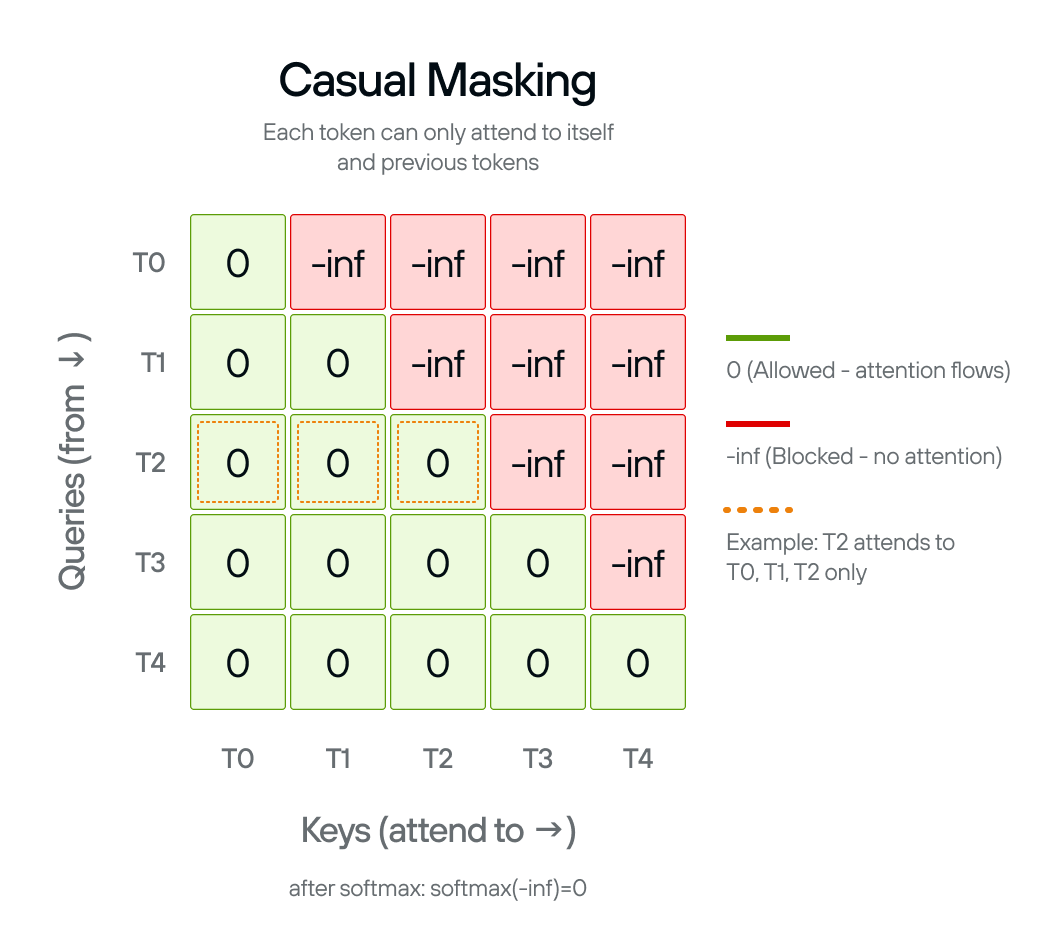
Causal mask matrix with lower triangular pattern Causal mask matrix with lower triangular pattern

GPT-2 generates text one token at a time, left-to-right. During training, causal masking prevents the model from “cheating” by looking ahead at tokens it should be predicting. Without this mask, the model would have access to information it won’t have during actual text generation.

Understanding the mask pattern

The mask creates a lower triangular pattern where each token can only attend to itself and previous tokens:

  • Position 0 attends to: position 0 only
  • Position 1 attends to: positions 0-1
  • Position 2 attends to: positions 0-2
  • And so on…

The mask shape is (sequence_length, sequence_length + num_tokens). This shape is designed for KV cache compatibility during generation. The KV cache stores key and value tensors from previously generated tokens, so you only need to compute attention for new tokens while attending to both new tokens (sequence_length) and cached tokens (num_tokens). This significantly speeds up generation by avoiding recomputation.

MAX operations

You’ll use the following MAX operations to complete this task:

Functional decorator:

  • @F.functional: Converts functions to graph operations for MAX compilation

Tensor operations:

Implementing the mask

You’ll create the causal mask in several steps:

  1. Import required modules:

    • Device from max.driver - specifies hardware device (CPU/GPU)
    • DType from max.dtype - data type specification
    • functional as F from max.nn - functional operations library
    • Tensor from max.tensor - tensor operations
    • Dim from graph.dim - dimension handling
  2. Add @F.functional decorator: This converts the function to a MAX graph operation.

  3. Calculate total sequence length: Combine sequence_length and num_tokens using Dim() to determine mask width.

  4. Create constant tensor: Use Tensor.constant(float("-inf"), dtype=dtype, device=device) to create a scalar that will be broadcast.

  5. Broadcast to target shape: Use F.broadcast_to(mask, shape=(sequence_length, n)) to expand the scalar to a 2D matrix.

  6. Apply band part: Use F.band_part(mask, num_lower=None, num_upper=0, exclude=True) to create the lower triangular pattern. This keeps 0s on and below the diagonal, -inf above.

Implementation (step_03.py):

# ===----------------------------------------------------------------------=== #
#
# This file is Modular Inc proprietary.
#
# ===----------------------------------------------------------------------=== #
"""
Step 03: Causal Masking

Implement causal attention masking that prevents tokens from attending to future positions.

Tasks:
1. Import functional module (as F) and Tensor from max.nn
2. Add @F.functional decorator to the causal_mask function
3. Create a constant tensor filled with negative infinity
4. Broadcast the mask to the correct shape (sequence_length, n)
5. Apply band_part to create the lower triangular causal structure

Run: pixi run s03
"""

# 1: Import the required modules from MAX
from max.driver import Device
from max.dtype import DType

# TODO: Import necessary funcional module from max.nn with the alias F
# https://docs.modular.com/max/api/python/nn/functional
# TODO: Import Tensor object from max.tensor
# https://docs.modular.com/max/api/python/tensor.Tensor
from max.graph import Dim, DimLike
from max.tensor import Tensor

# 2: Add the @F.functional decorator to make this a MAX functional operation
# TODO: Add the decorator here


def causal_mask(
    sequence_length: DimLike,
    num_tokens: DimLike,
    *,
    dtype: DType,
    device: Device,
) -> Tensor:
    """Create a causal mask for autoregressive attention.

    Args:
        sequence_length: Length of the sequence.
        num_tokens: Number of tokens.
        dtype: Data type for the mask.
        device: Device to create the mask on.

    Returns:
        A causal mask tensor.
    """
    # Calculate total sequence length
    n = Dim(sequence_length) + num_tokens

    # 3: Create a constant tensor filled with negative infinity
    # TODO: Use Tensor.constant() with float("-inf"), dtype, and device parameters
    # https://docs.modular.com/max/api/python/tensor#max.tensor.Tensor.constant
    # Hint: This creates the base mask value that will block attention to future tokens
    mask = None

    # 4: Broadcast the mask to the correct shape
    # TODO: Use F.broadcast_to() to expand mask to shape (sequence_length, n)
    # https://docs.modular.com/max/api/python/nn/functional#max.nn.functional.broadcast_to
    # Hint: This creates a 2D attention mask matrix
    mask = None

    # 5: Apply band_part to create the causal (lower triangular) structure and return the mask
    # TODO: Use F.band_part() with num_lower=None, num_upper=0, exclude=True
    # https://docs.modular.com/max/api/python/nn/functional/#max.nn.functional.band_part
    # Hint: This keeps only the lower triangle, allowing attention to past tokens only
    return None

Validation

Run pixi run s03 to verify your implementation.

Show solution
# ===----------------------------------------------------------------------=== #
#
# This file is Modular Inc proprietary.
#
# ===----------------------------------------------------------------------=== #
"""
Solution for Step 03: Causal Masking

This module implements causal attention masking that prevents tokens from
attending to future positions in autoregressive generation.
"""

import max.functional as F
from max.driver import Device
from max.dtype import DType
from max.graph import Dim, DimLike
from max.tensor import Tensor


@F.functional
def causal_mask(
    sequence_length: DimLike,
    num_tokens: DimLike,
    *,
    dtype: DType,
    device: Device,
) -> Tensor:
    """Create a causal mask for autoregressive attention.

    Args:
        sequence_length: Length of the sequence.
        num_tokens: Number of tokens.
        dtype: Data type for the mask.
        device: Device to create the mask on.

    Returns:
        A causal mask tensor.
    """
    n = Dim(sequence_length) + num_tokens
    mask = Tensor.constant(float("-inf"), dtype=dtype, device=device)
    mask = F.broadcast_to(mask, shape=(sequence_length, n))
    return F.band_part(mask, num_lower=None, num_upper=0, exclude=True)

Next: In Step 04, you’ll implement multi-head attention.

Multi-head attention

Learn to use multi-head attention, enabling the model to attend to different representation subspaces.

In this step, you’ll implement the GPT2MultiHeadAttention class that runs 12 attention operations in parallel. Instead of computing attention once over the full 768-dimensional space, you split the dimensions into 12 heads of 64 dimensions each. Each head learns to focus on different patterns.

GPT-2 uses 12 heads with 768-dimensional embeddings, giving each head 768 ÷ 12 = 64 dimensions. The Q, K, V tensors are reshaped to split the embedding dimension across heads, attention is computed for all heads in parallel, then the outputs are concatenated back together. This happens in a single efficient operation using tensor reshaping and broadcasting.

Multiple heads let the model learn complementary attention strategies. Different heads can specialize in different relationships, such as one that might attend to adjacent tokens, another to syntactic patterns, and another to semantic similarity. This increases the model’s capacity without dramatically increasing computation.

Understanding the architecture

Multi-head attention splits the embedding dimension, computes attention independently for each head, then merges the results. This requires careful tensor reshaping to organize the computation efficiently.

Head splitting: Transform from [batch, seq_length, 768] to [batch, 12, seq_length, 64]. First reshape to add the head dimension: [batch, seq_length, 12, 64]. Then transpose to move heads before sequence: [batch, 12, seq_length, 64]. Now each of the 12 heads operates independently on its 64-dimensional subspace.

Parallel attention: With shape [batch, num_heads, seq_length, head_dim], you can compute attention for all heads simultaneously. The matrix multiplication Q @ K^T operates on the last two dimensions [seq_length, head_dim] @ [head_dim, seq_length], broadcasting across the batch and head dimensions. All 12 heads computed in a single efficient operation.

Head merging: Reverse the splitting to go from [batch, 12, seq_length, 64] back to [batch, seq_length, 768]. First transpose to [batch, seq_length, 12, 64], then reshape to flatten the head dimension: [batch, seq_length, 768]. This concatenates all head outputs back into the original dimension.

Output projection (c_proj): After merging heads, apply a learned linear transformation that maps [batch, seq_length, 768] to [batch, seq_length, 768]. This lets the model mix information across heads, combining the different perspectives each head learned.

The layer names c_attn (combined Q/K/V projection) and c_proj (output projection) match Hugging Face’s GPT-2 implementation. This naming is essential for loading pretrained weights.

MAX operations

You’ll use the following MAX operations to complete this task:

Linear layers:

Tensor operations:

  • tensor.reshape(new_shape): Splits or merges head dimension
  • tensor.transpose(axis1, axis2): Rearranges dimensions for parallel attention
  • F.split(tensor, split_sizes, axis): Divides Q/K/V from combined projection

Implementing multi-head attention

You’ll create the GPT2MultiHeadAttention class with helper methods for splitting and merging heads.

First, import the required modules. You’ll need math for scaling, functional as F for operations, Tensor for type hints, device and dtype utilities, and Linear and Module from MAX’s neural network module. You’ll also need the causal_mask() function created in step 3.

In the __init__ method, create the projection layers and store configuration:

  • Combined Q/K/V projection: Linear(embed_dim, 3 * embed_dim, bias=True) stored as self.c_attn
  • Output projection: Linear(embed_dim, embed_dim, bias=True) stored as self.c_proj
  • Store self.num_heads (12) and self.head_dim (64) from config
  • Calculate self.split_size for splitting Q, K, V later

Implement _split_heads to reshape for parallel attention:

  • Calculate new shape by replacing the last dimension: tensor.shape[:-1] + [num_heads, attn_head_size]
  • Reshape to add the head dimension: tensor.reshape(new_shape)
  • Transpose to move heads to position 1: tensor.transpose(-3, -2)
  • Returns shape [batch, num_heads, seq_length, head_size]

Implement _merge_heads to concatenate head outputs:

  • Transpose to move heads back: tensor.transpose(-3, -2)
  • Calculate flattened shape: tensor.shape[:-2] + [num_heads * attn_head_size]
  • Reshape to merge heads: tensor.reshape(new_shape)
  • Returns shape [batch, seq_length, n_embd]

Implement _attn to compute scaled dot-product attention for all heads:

  • Compute attention scores: query @ key.transpose(-2, -1)
  • Scale by square root of head dimension
  • Apply causal mask to prevent attending to future positions
  • Apply softmax to get attention weights
  • Multiply weights by values: attn_weights @ value

In the forward method, orchestrate the complete multi-head attention:

  • Project to Q/K/V: qkv = self.c_attn(hidden_states)
  • Split into separate tensors: F.split(qkv, [self.split_size, self.split_size, self.split_size], axis=-1)
  • Split heads for each: query = self._split_heads(query, self.num_heads, self.head_dim) (repeat for key, value)
  • Compute attention: attn_output = self._attn(query, key, value)
  • Merge heads: attn_output = self._merge_heads(attn_output, self.num_heads, self.head_dim)
  • Final projection: return self.c_proj(attn_output)

Implementation (step_04.py):

# ===----------------------------------------------------------------------=== #
#
# This file is Modular Inc proprietary.
#
# ===----------------------------------------------------------------------=== #
"""
Step 04: Multi-head Attention

Implement multi-head attention that splits Q/K/V into multiple heads,
computes attention in parallel for each head, and merges the results.

Tasks:
1. Import required modules (math, F, Tensor, Linear, Module, etc.)
2. Create c_attn and c_proj linear layers
3. Implement _split_heads: reshape and transpose to add head dimension
4. Implement _merge_heads: transpose and reshape to remove head dimension
5. Implement _attn: compute attention for all heads in parallel
6. Implement forward pass: project -> split -> attend -> merge -> project

Run: pixi run s04
"""

# TODO: Import required modules
# Hint: You'll need math for scaling
# Hint: You'll need functional as F from max.nn
# Hint: You'll need Tensor, Device, DType from max.tensor and max.driver
# Hint: You'll need Dim, DimLike from max.graph
# Hint: You'll also need Linear and Module from max.nn

from max.tensor import Tensor
from step_01 import GPT2Config

# TODO: Copy causal_mask function from solution_02.py
# This is the same function you implemented in Step 02


class GPT2MultiHeadAttention(Module):
    """Multi-head attention for GPT-2."""

    def __init__(self, config: GPT2Config) -> None:
        super().__init__()

        self.embed_dim = config.n_embd
        self.num_heads = config.n_head
        self.head_dim = self.embed_dim // self.num_heads
        self.split_size = self.embed_dim

        # TODO: Create combined Q/K/V projection
        # Hint: Use Linear(self.embed_dim, 3 * self.embed_dim, bias=True)
        self.c_attn = None

        # TODO: Create output projection
        # Hint: Use Linear(self.embed_dim, self.embed_dim, bias=True)
        self.c_proj = None

    def _split_heads(
        self, tensor: Tensor, num_heads: int, attn_head_size: int
    ) -> Tensor:
        """Split the last dimension into (num_heads, head_size).

        Args:
            tensor: Input tensor, shape [batch, seq_length, n_embd]
            num_heads: Number of attention heads
            attn_head_size: Dimension of each head

        Returns:
            Tensor with shape [batch, num_heads, seq_length, head_size]
        """
        # TODO: Add head dimension
        # Hint: new_shape = tensor.shape[:-1] + [num_heads, attn_head_size]
        # Hint: tensor = tensor.reshape(new_shape)
        pass

        # TODO: Move heads dimension to position 1
        # Hint: return tensor.transpose(-3, -2)
        return None

    def _merge_heads(
        self, tensor: Tensor, num_heads: int, attn_head_size: int
    ) -> Tensor:
        """Merge attention heads back to original shape.

        Args:
            tensor: Input tensor, shape [batch, num_heads, seq_length, head_size]
            num_heads: Number of attention heads
            attn_head_size: Dimension of each head

        Returns:
            Tensor with shape [batch, seq_length, n_embd]
        """
        # TODO: Move heads dimension back
        # Hint: tensor = tensor.transpose(-3, -2)
        pass

        # TODO: Flatten head dimensions
        # Hint: new_shape = tensor.shape[:-2] + [num_heads * attn_head_size]
        # Hint: return tensor.reshape(new_shape)
        return None

    def _attn(self, query: Tensor, key: Tensor, value: Tensor) -> Tensor:
        """Compute attention for all heads in parallel.

        Args:
            query: Query tensor, shape [batch, num_heads, seq_length, head_size]
            key: Key tensor, shape [batch, num_heads, seq_length, head_size]
            value: Value tensor, shape [batch, num_heads, seq_length, head_size]

        Returns:
            Attention output, shape [batch, num_heads, seq_length, head_size]
        """
        # TODO: Implement attention computation
        # The same 5-step process: scores, scale, mask, softmax, weighted sum
        # Hint: Compute attention scores: query @ key.transpose(-1, -2)
        # Hint: Scale by sqrt(head_dim): attn_weights / math.sqrt(head_dim)
        # Hint: Apply causal mask using causal_mask function
        # Hint: Apply softmax: F.softmax(attn_weights)
        # Hint: Weighted sum: attn_weights @ value
        return None

    def forward(self, hidden_states: Tensor) -> Tensor:
        """Apply multi-head attention.

        Args:
            hidden_states: Input tensor, shape [batch, seq_length, n_embd]

        Returns:
            Attention output, shape [batch, seq_length, n_embd]
        """
        # TODO: Project to Q, K, V
        # Hint: qkv = self.c_attn(hidden_states)
        # Hint: query, key, value = F.split(qkv, [self.split_size, self.split_size, self.split_size], axis=-1)
        pass

        # TODO: Split into multiple heads
        # Hint: query = self._split_heads(query, self.num_heads, self.head_dim)
        # Hint: key = self._split_heads(key, self.num_heads, self.head_dim)
        # Hint: value = self._split_heads(value, self.num_heads, self.head_dim)
        pass

        # TODO: Apply attention
        # Hint: attn_output = self._attn(query, key, value)
        pass

        # TODO: Merge heads back
        # Hint: attn_output = self._merge_heads(attn_output, self.num_heads, self.head_dim)
        pass

        # TODO: Output projection
        # Hint: attn_output = self.c_proj(attn_output)
        # Hint: return attn_output
        return None

Validation

Run pixi run s04 to verify your implementation.

Show solution
# ===----------------------------------------------------------------------=== #
#
# This file is Modular Inc proprietary.
#
# ===----------------------------------------------------------------------=== #
"""Solution for Step 04: Multi-head Attention

This module implements multi-head attention, which allows the model to jointly
attend to information from different representation subspaces at different positions.
"""

import math
from typing import cast

import max.functional as F
from max.nn import Linear, Module
from max.tensor import Tensor
from step_01 import GPT2Config
from step_03 import causal_mask


class GPT2MultiHeadAttention(Module):
    """Multi-head attention for GPT-2, matching HuggingFace structure."""

    def __init__(self, config: GPT2Config) -> None:
        """Initialize multi-head attention.

        Args:
            config: GPT2Config containing n_embd and n_head
        """
        super().__init__()

        self.embed_dim = config.n_embd
        self.num_heads = config.n_head
        self.head_dim = self.embed_dim // self.num_heads
        self.split_size = self.embed_dim

        # Combined Q/K/V projection
        self.c_attn = Linear(self.embed_dim, 3 * self.embed_dim, bias=True)
        # Output projection
        self.c_proj = Linear(self.embed_dim, self.embed_dim, bias=True)

    def _split_heads(
        self, tensor: Tensor, num_heads: int, attn_head_size: int
    ) -> Tensor:
        """Split the last dimension into (num_heads, head_size).

        Transforms shape from [batch, seq_length, n_embd]
        to [batch, num_heads, seq_length, head_size]

        Args:
            tensor: Input tensor, shape [batch, seq_length, n_embd]
            num_heads: Number of attention heads
            attn_head_size: Dimension of each head

        Returns:
            Tensor with shape [batch, num_heads, seq_length, head_size]
        """
        # Add head dimension: [batch, seq_length, n_embd] -> [batch, seq_length, num_heads, head_size]
        new_shape = list(tensor.shape[:-1]) + [num_heads, attn_head_size]
        tensor = tensor.reshape(new_shape)
        # Move heads dimension: [batch, seq_length, num_heads, head_size] -> [batch, num_heads, seq_length, head_size]
        return tensor.transpose(-3, -2)

    def _merge_heads(
        self, tensor: Tensor, num_heads: int, attn_head_size: int
    ) -> Tensor:
        """Merge attention heads back to original shape.

        Transforms shape from [batch, num_heads, seq_length, head_size]
        to [batch, seq_length, n_embd]

        Args:
            tensor: Input tensor, shape [batch, num_heads, seq_length, head_size]
            num_heads: Number of attention heads
            attn_head_size: Dimension of each head

        Returns:
            Tensor with shape [batch, seq_length, n_embd]
        """
        # Move heads dimension back: [batch, num_heads, seq_length, head_size] -> [batch, seq_length, num_heads, head_size]
        tensor = tensor.transpose(-3, -2)
        # Flatten head dimensions: [batch, seq_length, num_heads, head_size] -> [batch, seq_length, n_embd]
        new_shape = list(tensor.shape[:-2]) + [num_heads * attn_head_size]
        return tensor.reshape(new_shape)

    def _attn(self, query: Tensor, key: Tensor, value: Tensor) -> Tensor:
        """Compute attention for all heads in parallel.

        Args:
            query: Query tensor, shape [batch, num_heads, seq_length, head_size]
            key: Key tensor, shape [batch, num_heads, seq_length, head_size]
            value: Value tensor, shape [batch, num_heads, seq_length, head_size]

        Returns:
            Attention output, shape [batch, num_heads, seq_length, head_size]
        """
        # Compute attention scores
        attn_weights = query @ key.transpose(-1, -2)

        # Scale attention weights
        attn_weights = attn_weights / math.sqrt(int(value.shape[-1]))

        # Apply causal mask
        seq_len = query.shape[-2]
        mask = causal_mask(seq_len, 0, dtype=query.dtype, device=query.device)
        attn_weights = attn_weights + mask

        # Softmax and weighted sum
        attn_weights = F.softmax(attn_weights)
        attn_output = attn_weights @ value

        return attn_output

    def forward(self, hidden_states: Tensor) -> Tensor:
        """Apply multi-head attention.

        Args:
            hidden_states: Input tensor, shape [batch, seq_length, n_embd]

        Returns:
            Attention output, shape [batch, seq_length, n_embd]
        """
        # Project to Q, K, V
        qkv = self.c_attn(hidden_states)
        split_result = F.split(
            qkv, [self.split_size, self.split_size, self.split_size], axis=-1
        )
        query = cast(Tensor, split_result[0])
        key = cast(Tensor, split_result[1])
        value = cast(Tensor, split_result[2])

        # Split into multiple heads
        query = self._split_heads(query, self.num_heads, self.head_dim)
        key = self._split_heads(key, self.num_heads, self.head_dim)
        value = self._split_heads(value, self.num_heads, self.head_dim)

        # Apply attention
        attn_output = self._attn(query, key, value)

        # Merge heads back
        attn_output = self._merge_heads(attn_output, self.num_heads, self.head_dim)

        # Output projection
        attn_output = self.c_proj(attn_output)

        return attn_output

Next: In Step 05, you’ll implement layer normalization to stabilize activations for effective training.

Layer normalization

Learn to implement layer normalization for stabilizing neural network training.

In this step, you’ll create the LayerNorm class that normalizes activations across the feature dimension. For each input, you compute the mean and variance across all features, normalize by subtracting the mean and dividing by the standard deviation, then apply learned weight and bias parameters to scale and shift the result.

Unlike batch normalization, layer normalization works independently for each example. This makes it ideal for transformers - no dependence on batch size, no tracking running statistics during inference, and consistent behavior between training and generation.

GPT-2 applies layer normalization before the attention and MLP blocks in each of its 12 transformer layers. This pre-normalization pattern stabilizes training in deep networks by keeping activations in a consistent range.

While layer normalization is most critical during training to stabilize gradients and prevent activations from exploding or vanishing, it’s still required during inference. The pretrained GPT-2 model we’re loading was trained with layer normalization - its learned weights and biases expect normalized inputs. Skipping layer normalization during inference would cause activations to be in completely different ranges than what the model learned during training, leading to poor or nonsensical outputs.

Understanding the operation

Layer normalization normalizes across the feature dimension (the last dimension) independently for each example. It learns two parameters per feature: weight (gamma) for scaling and bias (beta) for shifting.

The normalization follows this formula:

output = weight * (x - mean) / sqrt(variance + epsilon) + bias

The mean and variance are computed across all features in each example. After normalizing to zero mean and unit variance, the learned weight scales the result and the learned bias shifts it. The epsilon value (typically 1e-5) prevents division by zero when variance is very small.

MAX operations

You’ll use the following MAX operations to complete this task:

Modules:

  • Module: The Module class used for eager tensors

Tensor initialization:

Layer normalization:

  • F.layer_norm(): Applies layer normalization with parameters: input, gamma (weight), beta (bias), and epsilon

Implementing layer normalization

You’ll create the LayerNorm class that wraps MAX’s layer normalization function with learnable parameters. The implementation is straightforward - two parameters and a single function call.

First, import the required modules. You’ll need functional as F for the layer norm operation and Tensor for creating parameters.

In the __init__ method, create two learnable parameters:

  • Weight: Tensor.ones([dim]) stored as self.weight - initialized to ones so the initial transformation is identity
  • Bias: Tensor.zeros([dim]) stored as self.bias - initialized to zeros so there’s no initial shift

Store the epsilon value as self.eps for numerical stability.

In the forward method, apply layer normalization with F.layer_norm(x, gamma=self.weight, beta=self.bias, epsilon=self.eps). This computes the normalization and applies the learned parameters in one operation.

Implementation (step_05.py):

# ===----------------------------------------------------------------------=== #
#
# This file is Modular Inc proprietary.
#
# ===----------------------------------------------------------------------=== #
"""
Step 05: Layer Normalization

Implement layer normalization that normalizes activations for training stability.

Tasks:
1. Import functional module (as F) and Tensor from max.nn
2. Initialize learnable weight (gamma) and bias (beta) parameters
3. Apply layer normalization using F.layer_norm in the forward pass

Run: pixi run s05
"""

# 1: Import the required modules from MAX
# TODO: Import functional module from max.nn with the alias F
# https://docs.modular.com/max/api/python/nn/functional

# TODO: Import Tensor from max.tensor
# https://docs.modular.com/max/api/python/tensor.Tensor

from max.graph import DimLike
from max.nn import Module
from max.tensor import Tensor


class LayerNorm(Module):
    """Layer normalization module.

    Args:
        dim: Dimension to normalize over.
        eps: Epsilon for numerical stability.
    """

    def __init__(self, dim: DimLike, *, eps: float = 1e-5) -> None:
        super().__init__()
        self.eps = eps

        # 2: Initialize learnable weight and bias parameters
        # TODO: Create self.weight as a Tensor of ones with shape [dim]
        # https://docs.modular.com/max/api/python/tensor#max.tensor.Tensor.ones
        # Hint: This is the gamma parameter in layer normalization
        self.weight = None

        # TODO: Create self.bias as a Tensor of zeros with shape [dim]
        # https://docs.modular.com/max/api/python/tensor#max.tensor.Tensor.zeros
        # Hint: This is the beta parameter in layer normalization
        self.bias = None

    def forward(self, x: Tensor) -> Tensor:
        """Apply layer normalization.

        Args:
            x: Input tensor.

        Returns:
            Normalized tensor.
        """
        # 3: Apply layer normalization and return the result
        # TODO: Use F.layer_norm() with x, gamma=self.weight, beta=self.bias, epsilon=self.eps
        # https://docs.modular.com/max/api/python/nn/functional#max.nn.functional.layer_norm
        # Hint: Layer normalization normalizes across the last dimension
        return None

Validation

Run pixi run s05 to verify your implementation.

Show solution
# ===----------------------------------------------------------------------=== #
#
# This file is Modular Inc proprietary.
#
# ===----------------------------------------------------------------------=== #
"""
Solution for Step 05: Layer Normalization

This module implements layer normalization that normalizes activations
across the embedding dimension for training stability.
"""

import max.functional as F
from max.graph import DimLike
from max.nn import Module
from max.tensor import Tensor


class LayerNorm(Module):
    """Layer normalization module.

    Args:
        dim: Dimension to normalize over.
        eps: Epsilon for numerical stability.
    """

    def __init__(self, dim: DimLike, *, eps: float = 1e-5) -> None:
        super().__init__()
        self.eps = eps
        self.weight = Tensor.ones([dim])
        self.bias = Tensor.zeros([dim])

    def forward(self, x: Tensor) -> Tensor:
        """Apply layer normalization.

        Args:
            x: Input tensor.

        Returns:
            Normalized tensor.
        """
        return F.layer_norm(x, gamma=self.weight, beta=self.bias, epsilon=self.eps)

Next: In Step 06, you’ll combine multi-head attention, MLP, layer norm, and residual connections into a complete transformer block.

Transformer block

Learn to combine attention, MLP, layer normalization, and residual connections into a complete transformer block.

In this step, you’ll build a GPT-2 transformer block in the GPT2Block class. The transformer block is the definitive feature of GPT-2 and any other transformer model. It includes a series of self-attention layers (the multi-head attention block), a simple feed-forward network (the MLP block), and layer normalization—all of which you’ve already built in the previous steps.

The block processes input through two sequential operations. First, it applies layer norm, runs multi-head attention, then adds the result back to the input (residual connection). Second, it applies another layer norm, runs the MLP, and adds that result back. This pattern is x = x + sublayer(layer_norm(x)), called pre-normalization.

GPT-2 uses pre-norm because it stabilizes training in deep networks. By normalizing before each sublayer instead of after, gradients flow more smoothly through the network’s 12 stacked blocks.

Understanding the components

The transformer block consists of four components, applied in this order:

First layer norm (ln_1): Normalizes the input before attention. Uses epsilon=1e-5 for numerical stability.

Multi-head attention (attn): The self-attention mechanism from Step 04. Lets each position attend to all previous positions.

Second layer norm (ln_2): Normalizes before the MLP. Same configuration as the first.

Feed-forward network (mlp): The position-wise MLP from Step 02. Expands to 3,072 dimensions internally (4× the embedding size), then projects back to 768.

The block maintains a constant 768-dimensional representation throughout. Input shape [batch, seq_length, 768] stays the same after each sublayer, which is essential for stacking 12 blocks together.

Understanding the flow

Each sublayer follows the pre-norm pattern:

  1. Save the input as residual
  2. Apply layer normalization to the input
  3. Process through the sublayer (attention or MLP)
  4. Add the original residual back to the output

This happens twice per block, once for attention and once for the MLP. The residual connections let gradients flow directly through the network, preventing vanishing gradients in deep models.

Component names (ln_1, attn, ln_2, mlp) match Hugging Face’s GPT-2 implementation. This matters for loading pretrained weights in later steps.

Implementing the block

You’ll create the GPT2Block class by composing the components from earlier steps. The block takes GPT2Config and creates four sublayers, then applies them in sequence with residual connections.

First, import the required modules. You’ll need Module from MAX, plus the previously implemented components: GPT2Config, GPT2MLP, GPT2MultiHeadAttention, and LayerNorm.

In the __init__ method, create the four sublayers:

  • ln_1: LayerNorm(config.n_embd, eps=config.layer_norm_epsilon)
  • attn: GPT2MultiHeadAttention(config)
  • ln_2: LayerNorm(config.n_embd, eps=config.layer_norm_epsilon)
  • mlp: GPT2MLP(4 * config.n_embd, config)

The MLP uses 4 * config.n_embd (3,072 dimensions) as its inner dimension, following the standard transformer ratio.

In the forward method, implement the two sublayer blocks:

Attention block:

  1. Save residual = hidden_states
  2. Normalize: hidden_states = self.ln_1(hidden_states)
  3. Apply attention: attn_output = self.attn(hidden_states)
  4. Add back: hidden_states = attn_output + residual

MLP block:

  1. Save residual = hidden_states
  2. Normalize: hidden_states = self.ln_2(hidden_states)
  3. Apply MLP: feed_forward_hidden_states = self.mlp(hidden_states)
  4. Add back: hidden_states = residual + feed_forward_hidden_states

Finally, return hidden_states.

Implementation (step_06.py):

# ===----------------------------------------------------------------------=== #
#
# This file is Modular Inc proprietary.
#
# ===----------------------------------------------------------------------=== #
"""
Step 06: Transformer Block

Combine multi-head attention, MLP, layer normalization, and residual
connections into a complete transformer block.

Tasks:
1. Import Module and all previous solution components
2. Create ln_1, attn, ln_2, and mlp layers
3. Implement forward pass with pre-norm residual pattern

Run: pixi run s06
"""

# TODO: Import required modules
# Hint: You'll need Module from max.nn

from max.tensor import Tensor
from step_01 import GPT2Config


class GPT2Block(Module):
    """Complete GPT-2 transformer block."""

    def __init__(self, config: GPT2Config) -> None:
        """Initialize transformer block.

        Args:
            config: GPT2Config containing model hyperparameters
        """
        super().__init__()

        hidden_size = config.n_embd
        inner_dim = (
            config.n_inner
            if hasattr(config, "n_inner") and config.n_inner is not None
            else 4 * hidden_size
        )

        # TODO: Create first layer norm (before attention)
        # Hint: Use LayerNorm(hidden_size, eps=config.layer_norm_epsilon)
        self.ln_1 = None

        # TODO: Create multi-head attention
        # Hint: Use GPT2MultiHeadAttention(config)
        self.attn = None

        # TODO: Create second layer norm (before MLP)
        # Hint: Use LayerNorm(hidden_size, eps=config.layer_norm_epsilon)
        self.ln_2 = None

        # TODO: Create MLP
        # Hint: Use GPT2MLP(inner_dim, config)
        self.mlp = None

    def forward(self, hidden_states: Tensor) -> Tensor:
        """Apply transformer block.

        Args:
            hidden_states: Input tensor, shape [batch, seq_length, n_embd]

        Returns:
            Output tensor, shape [batch, seq_length, n_embd]
        """
        # TODO: Attention block with residual connection
        # Hint: residual = hidden_states
        # Hint: hidden_states = self.ln_1(hidden_states)
        # Hint: attn_output = self.attn(hidden_states)
        # Hint: hidden_states = attn_output + residual
        pass

        # TODO: MLP block with residual connection
        # Hint: residual = hidden_states
        # Hint: hidden_states = self.ln_2(hidden_states)
        # Hint: feed_forward_hidden_states = self.mlp(hidden_states)
        # Hint: hidden_states = residual + feed_forward_hidden_states
        pass

        # TODO: Return the output
        return None

Validation

Run pixi run s06 to verify your implementation.

Show solution
# ===----------------------------------------------------------------------=== #
#
# This file is Modular Inc proprietary.
#
# ===----------------------------------------------------------------------=== #
"""
Solution for Step 06: Transformer Block

This module implements a complete GPT-2 transformer block, combining
multi-head attention, MLP, layer normalization, and residual connections.
"""

from max.nn import Module
from max.tensor import Tensor
from step_01 import GPT2Config
from step_02 import GPT2MLP
from step_04 import GPT2MultiHeadAttention
from step_05 import LayerNorm


class GPT2Block(Module):
    """Complete GPT-2 transformer block matching HuggingFace structure.

    Architecture (pre-norm):
    1. x = x + attention(layer_norm(x))
    2. x = x + mlp(layer_norm(x))
    """

    def __init__(self, config: GPT2Config) -> None:
        """Initialize transformer block.

        Args:
            config: GPT2Config containing model hyperparameters
        """
        super().__init__()

        hidden_size = config.n_embd
        # Inner dimension for MLP (4x hidden size by default)
        inner_dim = (
            config.n_inner
            if hasattr(config, "n_inner") and config.n_inner is not None
            else 4 * hidden_size
        )

        # First layer norm (before attention)
        self.ln_1 = LayerNorm(hidden_size, eps=config.layer_norm_epsilon)
        # Multi-head attention
        self.attn = GPT2MultiHeadAttention(config)
        # Second layer norm (before MLP)
        self.ln_2 = LayerNorm(hidden_size, eps=config.layer_norm_epsilon)
        # Feed-forward MLP
        self.mlp = GPT2MLP(inner_dim, config)

    def forward(self, hidden_states: Tensor) -> Tensor:
        """Apply transformer block.

        Args:
            hidden_states: Input tensor, shape [batch, seq_length, n_embd]

        Returns:
            Output tensor, shape [batch, seq_length, n_embd]
        """
        # Attention block with residual connection
        residual = hidden_states
        hidden_states = self.ln_1(hidden_states)
        attn_output = self.attn(hidden_states)
        hidden_states = attn_output + residual

        # MLP block with residual connection
        residual = hidden_states
        hidden_states = self.ln_2(hidden_states)
        feed_forward_hidden_states = self.mlp(hidden_states)
        hidden_states = residual + feed_forward_hidden_states

        return hidden_states

Next: In Step 07, you’ll stack 12 transformer blocks together to create the main body of the GPT-2 model.

Stacking transformer blocks

Learn to stack 12 transformer blocks with embeddings and final normalization to create the complete GPT-2 model.

In this step, you’ll create the body of the GPT-2 model (the MaxGPT2Model module) as a sequence of transformer blocks (GPT2Block) plus LayerNorm. And because the model body receives raw token IDs during inference, you’ll also have to first convert the token IDs into token embeddings that are suitable for processing by the transformer blocks and the rest of the neural network.

The model processes input in four stages: convert token IDs to embeddings, add position information, pass through 12 transformer blocks sequentially, and normalize the final output. Each transformer block refines the representation, building up from surface patterns in early layers to semantic understanding in later layers.

GPT-2 uses 12 layers because this depth allows the model to learn complex patterns while remaining trainable. Fewer layers would limit the model’s capacity. More layers would increase training difficulty without proportional gains in quality for a 117M parameter model.

Understanding the components

The complete model has four main components:

Token embeddings (wte): Maps each token ID to a 768-dimensional vector using a lookup table with 50,257 entries (one per vocabulary token).

Position embeddings (wpe): Maps each position (0 to 1,023) to a 768-dimensional vector. These are added to token embeddings so the model knows token order.

Transformer blocks (h): 12 identical blocks stacked using MAX’s Sequential module. Sequential applies blocks in order, passing each block’s output to the next.

Final layer norm (ln_f): Normalizes the output after all blocks. This stabilizes the representation before the language model head (added in Step 11) projects to vocabulary logits.

Understanding the forward pass

The forward method processes token IDs through the model:

First, create position indices using Tensor.arange. Generate positions [0, 1, 2, …, seq_length-1] matching the input’s dtype and device. This ensures compatibility when adding to embeddings.

Next, look up embeddings. Get token embeddings with self.wte(input_ids) and position embeddings with self.wpe(position_indices). Add them together element-wise, as both are shape [batch, seq_length, 768].

Then, pass through the transformer blocks with self.h(x). The Sequential module applies all 12 transformer blocks in order, each refining the representation.

Finally, normalize the output with self.ln_f(x) and return the result. The output shape matches the input: [batch, seq_length, 768].

MAX operations

You’ll use the following MAX operations to complete this task:

Module composition:

Embeddings:

Position generation:

Implementing the model

You’ll create the MaxGPT2Model class by composing embedding layers, transformer blocks, and layer normalization. The class builds on all the components from previous steps.

First, import the required modules. You’ll need Tensor for position indices, Embedding, Module, and Sequential from MAX’s neural network module, plus the previously implemented GPT2Config, LayerNorm, and GPT2Block.

In the __init__ method, create the four components:

  • Token embeddings: Embedding(config.vocab_size, dim=config.n_embd) stored as self.wte
  • Position embeddings: Embedding(config.n_positions, dim=config.n_embd) stored as self.wpe
  • Transformer blocks: Sequential(*(GPT2Block(config) for _ in range(config.n_layer))) stored as self.h
  • Final layer norm: LayerNorm(config.n_embd, eps=config.layer_norm_epsilon) stored as self.ln_f

The Sequential module takes a generator expression that creates 12 identical GPT2Block instances. The * unpacks them as arguments to Sequential.

In the forward method, implement the four-stage processing:

  1. Get the sequence length from input_ids.shape
  2. Create position indices: Tensor.arange(seq_length, dtype=input_ids.dtype, device=input_ids.device)
  3. Look up embeddings and add them: x = self.wte(input_ids) + self.wpe(position_indices)
  4. Apply transformer blocks: x = self.h(x)
  5. Apply final normalization: x = self.ln_f(x)
  6. Return x

The position indices must match the input’s dtype and device to ensure the tensors are compatible for addition.

Implementation (step_07.py):

# ===----------------------------------------------------------------------=== #
#
# This file is Modular Inc proprietary.
#
# ===----------------------------------------------------------------------=== #
"""
Step 07: Stacking Transformer Blocks

Stack multiple transformer blocks with embeddings to create
the complete GPT-2 model architecture.

Tasks:
1. Import Tensor, Embedding, Module, Sequential, and previous components
2. Create token and position embeddings
3. Stack n_layer transformer blocks using Sequential
4. Create final layer normalization
5. Implement forward pass: embeddings -> blocks -> layer norm

Run: pixi run s10
"""

# TODO: Import required modules
# Hint: You'll need Tensor from max.tensor
# Hint: You'll need Embedding, Module, Sequential from max.nn

from max.tensor import Tensor
from step_01 import GPT2Config


class MaxGPT2Model(Module):
    """Complete GPT-2 transformer model."""

    def __init__(self, config: GPT2Config) -> None:
        """Initialize GPT-2 model.

        Args:
            config: GPT2Config containing model hyperparameters
        """
        super().__init__()

        # TODO: Create token embeddings
        # Hint: Use Embedding(config.vocab_size, dim=config.n_embd)
        self.wte = None

        # TODO: Create position embeddings
        # Hint: Use Embedding(config.n_positions, dim=config.n_embd)
        self.wpe = None

        # TODO: Stack transformer blocks
        # Hint: Use Sequential(*(GPT2Block(config) for _ in range(config.n_layer)))
        # This creates config.n_layer blocks (12 for GPT-2 base)
        self.h = None

        # TODO: Create final layer normalization
        # Hint: Use LayerNorm(config.n_embd, eps=config.layer_norm_epsilon)
        self.ln_f = None

    def forward(self, input_ids: Tensor) -> Tensor:
        """Forward pass through the transformer.

        Args:
            input_ids: Token IDs, shape [batch, seq_length]

        Returns:
            Hidden states, shape [batch, seq_length, n_embd]
        """
        # TODO: Get batch size and sequence length
        # Hint: batch_size, seq_length = input_ids.shape
        pass

        # TODO: Get token embeddings
        # Hint: tok_embeds = self.wte(input_ids)
        pass

        # TODO: Get position embeddings
        # Hint: Create position indices with Tensor.arange(seq_length, dtype=input_ids.dtype, device=input_ids.device)
        # Hint: pos_embeds = self.wpe(position_indices)
        pass

        # TODO: Combine embeddings
        # Hint: x = tok_embeds + pos_embeds
        pass

        # TODO: Apply transformer blocks
        # Hint: x = self.h(x)
        pass

        # TODO: Apply final layer norm
        # Hint: x = self.ln_f(x)
        pass

        # TODO: Return the output
        return None

Validation

Run pixi run s07 to verify your implementation.

Show solution
# ===----------------------------------------------------------------------=== #
#
# This file is Modular Inc proprietary.
#
# ===----------------------------------------------------------------------=== #
"""
Solution for Step 07: Stacking Transformer Blocks

This module stacks multiple transformer blocks and adds embeddings
to create the complete GPT-2 transformer architecture.
"""

from max.nn import Embedding, Module, Sequential
from max.tensor import Tensor
from step_01 import GPT2Config
from step_05 import LayerNorm
from step_06 import GPT2Block


class MaxGPT2Model(Module):
    """Complete GPT-2 transformer model matching HuggingFace structure.

    Architecture:
    1. Token embeddings + position embeddings
    2. Stack of n_layer transformer blocks
    3. Final layer normalization
    """

    def __init__(self, config: GPT2Config) -> None:
        """Initialize GPT-2 model.

        Args:
            config: GPT2Config containing model hyperparameters
        """
        super().__init__()

        # Token embeddings (vocabulary -> embeddings)
        self.wte = Embedding(config.vocab_size, dim=config.n_embd)
        # Position embeddings (positions -> embeddings)
        self.wpe = Embedding(config.n_positions, dim=config.n_embd)

        # Stack of transformer blocks
        self.h = Sequential(*(GPT2Block(config) for _ in range(config.n_layer)))

        # Final layer normalization
        self.ln_f = LayerNorm(config.n_embd, eps=config.layer_norm_epsilon)

    def forward(self, input_ids: Tensor) -> Tensor:
        """Forward pass through the transformer.

        Args:
            input_ids: Token IDs, shape [batch, seq_length]

        Returns:
            Hidden states, shape [batch, seq_length, n_embd]
        """
        _, seq_length = input_ids.shape

        # Get token embeddings
        tok_embeds = self.wte(input_ids)

        # Get position embeddings
        pos_embeds = self.wpe(
            Tensor.arange(seq_length, dtype=input_ids.dtype, device=input_ids.device)
        )

        # Combine embeddings
        x = tok_embeds + pos_embeds

        # Apply transformer blocks
        x = self.h(x)

        # Final layer norm
        x = self.ln_f(x)

        return x

Next: In Step 08, you’ll add the language modeling head that projects hidden states to vocabulary logits for text generation.

Language model head

Learn to add the final linear projection layer that converts hidden states to vocabulary logits for next-token prediction.

In this step, you’ll create the MaxGPT2LMHeadModel, which combines the model body (MaxGPT2Model) with a head Linear layer, thus completing the GPT-2 model that can predict next tokens. This class wraps the transformer from step 7 and adds a final linear layer that projects 768-dimensional hidden states to 50,257-dimensional vocabulary logits.

The language model head is a single linear layer without bias. For each position in the sequence, it outputs a score for every possible next token. Higher scores indicate the model thinks that token is more likely to come next.

At 768 × 50,257 = 38.6M parameters, the LM head is the single largest component in GPT-2, representing about 33% of the model’s 117M total parameters. This is larger than all 12 transformer blocks combined.

Understanding the projection

The language model head performs a simple linear projection using MAX’s Linear layer. It maps each 768-dimensional hidden state to 50,257 scores, one per vocabulary token.

The layer uses bias=False, meaning it only has weights and no bias vector. This saves 50,257 parameters (about 0.4% of model size). The bias provides little benefit because the layer normalization before the LM head already centers the activations. Adding a constant bias to all logits wouldn’t change the relative probabilities after softmax.

The output is called “logits,” which are raw scores before applying softmax. Logits can be any real number. During text generation (Step 10), you’ll convert logits to probabilities with softmax. Working with logits directly enables techniques like temperature scaling and top-k sampling.

Understanding the complete model

With the LM head added, you now have the complete GPT-2 architecture:

  1. Input: Token IDs [batch, seq_length]
  2. Embeddings: Token + position [batch, seq_length, 768]
  3. Transformer blocks: 12 blocks process the embeddings [batch, seq_length, 768]
  4. Final layer norm: Normalizes the output [batch, seq_length, 768]
  5. LM head: Projects to vocabulary [batch, seq_length, 50257]
  6. Output: Logits [batch, seq_length, 50257]

Each position gets independent logits over the vocabulary. To predict the next token after position i, you look at the logits at position i. The highest scoring token is the model’s top prediction.

MAX operations

You’ll use the following MAX operations to complete this task:

Linear layer:

Implementing the language model

You’ll create the MaxGPT2LMHeadModel class that wraps the transformer with a language modeling head. The implementation is straightforward, with just two components and a simple forward pass.

First, import the required modules. You’ll need Linear and Module from MAX, plus the previously implemented GPT2Config and MaxGPT2Model.

In the __init__ method, create two components:

  • Transformer: MaxGPT2Model(config) stored as self.transformer
  • LM head: Linear(config.n_embd, config.vocab_size, bias=False) stored as self.lm_head

Note the bias=False parameter, which creates a linear layer without bias terms.

In the forward method, implement a simple two-step process:

  1. Get hidden states from the transformer: hidden_states = self.transformer(input_ids)
  2. Project to vocabulary logits: logits = self.lm_head(hidden_states)
  3. Return logits

That’s it. The model takes token IDs and returns logits. In the next step, you’ll use these logits to generate text.

Implementation (step_08.py):

# ===----------------------------------------------------------------------=== #
#
# This file is Modular Inc proprietary.
#
# ===----------------------------------------------------------------------=== #
"""
Step 08: Language Model Head

Add the final projection layer that converts hidden states to vocabulary logits.

Tasks:
1. Import Linear, Module, and previous components
2. Create transformer and lm_head layers
3. Implement forward pass: transformer -> lm_head

Run: pixi run s08
"""

# TODO: Import required modules
# Hint: You'll need Linear and Module from max.nn

from max.tensor import Tensor
from step_01 import GPT2Config


class MaxGPT2LMHeadModel(Module):
    """Complete GPT-2 model with language modeling head."""

    def __init__(self, config: GPT2Config) -> None:
        """Initialize GPT-2 with LM head.

        Args:
            config: GPT2Config containing model hyperparameters
        """
        super().__init__()

        self.config = config

        # TODO: Create the transformer
        # Hint: Use MaxGPT2Model(config)
        self.transformer = None

        # TODO: Create language modeling head
        # Hint: Use Linear(config.n_embd, config.vocab_size, bias=False)
        # Projects from hidden dimension to vocabulary size
        self.lm_head = None

    def forward(self, input_ids: Tensor) -> Tensor:
        """Forward pass through transformer and LM head.

        Args:
            input_ids: Token IDs, shape [batch, seq_length]

        Returns:
            Logits over vocabulary, shape [batch, seq_length, vocab_size]
        """
        # TODO: Get hidden states from transformer
        # Hint: hidden_states = self.transformer(input_ids)
        pass

        # TODO: Project to vocabulary logits
        # Hint: logits = self.lm_head(hidden_states)
        pass

        # TODO: Return logits
        return None

Validation

Run pixi run s08 to verify your implementation.

Show solution
# ===----------------------------------------------------------------------=== #
#
# This file is Modular Inc proprietary.
#
# ===----------------------------------------------------------------------=== #
"""
Solution for Step 08: Language Model Head

This module adds the final projection layer that converts hidden states
to vocabulary logits for predicting the next token.
"""

from max.nn import Linear, Module
from max.tensor import Tensor
from step_01 import GPT2Config
from step_07 import MaxGPT2Model


class MaxGPT2LMHeadModel(Module):
    """Complete GPT-2 model with language modeling head.

    This is the full model that can be used for text generation.
    """

    def __init__(self, config: GPT2Config) -> None:
        """Initialize GPT-2 with LM head.

        Args:
            config: GPT2Config containing model hyperparameters
        """
        super().__init__()

        self.config = config
        # The transformer (embeddings + blocks + final norm)
        self.transformer = MaxGPT2Model(config)
        # Language modeling head (hidden states -> vocabulary logits)
        self.lm_head = Linear(config.n_embd, config.vocab_size, bias=False)

    def forward(self, input_ids: Tensor) -> Tensor:
        """Forward pass through transformer and LM head.

        Args:
            input_ids: Token IDs, shape [batch, seq_length]

        Returns:
            Logits over vocabulary, shape [batch, seq_length, vocab_size]
        """
        # Get hidden states from transformer
        hidden_states = self.transformer(input_ids)

        # Project to vocabulary logits
        logits = self.lm_head(hidden_states)

        return logits

Next: In Step 09, you’ll implement tokenization functions to convert between text and token IDs.

Encode and decode tokens

Learn to convert between text and token IDs using tokenizers and MAX tensors.

In this step, you’ll implement utility functions to bridge the gap between text and the token IDs your model operates on. The encode_text() function converts an input string into a tensor of token IDs, while decode_tokens() converts token IDs into a string.

As you saw when building the model body in step 7 (MaxGPT2Model), the model must receive input as token IDs (not raw text). The token IDs are integers that represent pieces of text according to a tokenizer vocabulary. GPT-2 uses a Byte Pair Encoding (BPE) tokenizer, which breaks text into subword units. For example, “Hello world” becomes [15496, 995] - two tokens representing the words.

You’ll use the Hugging Face tokenizer to handle the text-to-token conversion, then wrap it with functions that work with MAX tensors. This separation keeps tokenization (a preprocessing step) separate from model inference (tensor operations).

Understanding tokenization

Tokenization converts text to a list of integers. The GPT-2 tokenizer uses a vocabulary of 50,257 tokens, where common words get single tokens and rare words split into subwords.

The HuggingFace tokenizer provides an encode method that takes text and returns a Python list of token IDs. For example:

token_ids = tokenizer.encode("Hello world")  # Returns [15496, 995]

You can specify max_length and truncation=True to limit sequence length. If the text exceeds max_length, the tokenizer cuts it off. This prevents memory issues with very long inputs.

After encoding, you need to convert the Python list to a MAX tensor. Use Tensor.constant to create a tensor with the token IDs, specifying dtype=DType.int64 (GPT-2 expects 64-bit integers) and the target device.

The tensor needs shape [batch, seq_length] for model input. Wrap the token list in another list to add the batch dimension: [token_ids] becomes [[15496, 995]] with shape [1, 2].

Understanding decoding

Decoding reverses tokenization: convert token IDs back to text. This requires moving tensors from GPU to CPU, converting to NumPy, then using the tokenizer’s decode method.

First, transfer the tensor to CPU with .to(CPU()). MAX tensors can live on GPU or CPU, but Python libraries like NumPy only work with CPU data.

Next, convert to NumPy using np.from_dlpack. DLPack is a standard that enables zero-copy tensor sharing between frameworks. The MAX tensor and NumPy array share the same underlying memory.

If the tensor is 2D (batch dimension present), flatten it to 1D with .flatten(). The tokenizer expects a flat list of token IDs, not a batched format.

Finally, convert to a Python list with .tolist() and decode with tokenizer.decode(token_ids, skip_special_tokens=True). The skip_special_tokens=True parameter removes padding and end-of-sequence markers from the output.

MAX operations

You’ll use the following MAX operations to complete this task:

Tensor creation:

Device transfer:

NumPy interop:

  • np.from_dlpack(tensor): Converts MAX tensor to NumPy using DLPack protocol

Implementing tokenization

You’ll create two functions: encode_text to convert strings to tensors, and decode_tokens to convert tensors back to strings.

First, import the required modules. You’ll need numpy as np for array operations, CPU from MAX’s driver for device specification, DType for specifying integer types, and Tensor for creating and manipulating tensors.

In encode_text, implement the encoding and conversion:

  1. Encode the text to token IDs using the tokenizer: token_ids = tokenizer.encode(text, max_length=max_length, truncation=True)
  2. Convert to a MAX tensor with batch dimension: Tensor.constant([token_ids], dtype=DType.int64, device=device)

Note the [token_ids] wrapping to create the batch dimension. This gives shape [1, seq_length] instead of just [seq_length].

In decode_tokens, implement the reverse process with explicit type conversions:

  1. Transfer to CPU and convert to NumPy with explicit type annotation: token_ids_np: np.ndarray = np.from_dlpack(token_ids.to(CPU()))
  2. Flatten if needed: if token_ids_np.ndim > 1: token_ids_np = token_ids_np.flatten()
  3. Convert to Python list with explicit type annotation: token_ids_list: list = token_ids_np.tolist()
  4. Decode to text: return tokenizer.decode(token_ids_list, skip_special_tokens=True)

Note the use of separate variable names (token_ids_np, token_ids_list) instead of reusing the same variable. This makes the type conversions explicit and improves code clarity: Tensornp.ndarrayliststr. The flattening step handles both 1D and 2D tensors, making the function work with single sequences or batches.

Implementation (step_09.py):

# ===----------------------------------------------------------------------=== #
#
# This file is Modular Inc proprietary.
#
# ===----------------------------------------------------------------------=== #
"""
Step 09: Encode and decode tokens

This module provides utility functions to tokenize input text
and decode token IDs back to text using a tokenizer.

Tasks:
1. Tokenize text and convert to tensor
2. Decode token IDs back to text

Run: pixi run s09
"""

# TODO: Import required modules
# Hint: You'll need numpy as np
# Hint: You'll need CPU from max.driver
# Hint: You'll need DType from max.dtype
# Hint: You'll need Tensor from max.tensor

from max.driver import Device
from max.tensor import Tensor
from transformers import GPT2Tokenizer


def encode_text(
    text: str, tokenizer: GPT2Tokenizer, device: Device, max_length: int = 128
) -> Tensor:
    """Tokenize text and convert to tensor.

    Args:
        text: Input text to tokenize
        tokenizer: HuggingFace tokenizer
        device: Device to place tensor on
        max_length: Maximum sequence length

    Returns:
        Tensor of token IDs with shape [1, seq_length]
    """
    # TODO: Encode text to token IDs
    # Hint: token_ids = tokenizer.encode(text, max_length=max_length, truncation=True)
    pass

    # TODO: Convert to MAX tensor
    # Hint: return Tensor.constant([token_ids], dtype=DType.int64, device=device)
    # Note: Wrap tokens in a list to create batch dimension
    return None


def decode_tokens(token_ids: Tensor, tokenizer: GPT2Tokenizer) -> str:
    """Decode token IDs back to text.

    Args:
        token_ids: Tensor of token IDs
        tokenizer: HuggingFace tokenizer

    Returns:
        Decoded text string
    """
    # TODO: Convert MAX tensor to NumPy array explicitly
    # Hint: Create a new variable with type annotation: token_ids_np: np.ndarray
    # Hint: token_ids_np = np.from_dlpack(token_ids.to(CPU()))
    # Note: This makes the type conversion from Tensor to np.ndarray explicit
    pass

    # TODO: Flatten if needed
    # Hint: if token_ids_np.ndim > 1: token_ids_np = token_ids_np.flatten()
    pass

    # TODO: Convert to Python list explicitly
    # Hint: Create a new variable: token_ids_list: list = token_ids_np.tolist()
    # Note: This makes the conversion from np.ndarray to list explicit
    pass

    # TODO: Decode to text
    # Hint: return tokenizer.decode(token_ids_list, skip_special_tokens=True)
    return None

Validation

Run pixi run s09 to verify your implementation correctly converts text to tensors and back.

Show solution
# ===----------------------------------------------------------------------=== #
#
# This file is Modular Inc proprietary.
#
# ===----------------------------------------------------------------------=== #
"""
Solution for Step 09: Encode and decode tokens

This module provides utility functions to tokenize input text
and decode token IDs back to text using a tokenizer.
"""

import numpy as np
from max.driver import CPU, Device
from max.dtype import DType
from max.tensor import Tensor
from transformers import GPT2Tokenizer


def encode_text(
    text: str, tokenizer: GPT2Tokenizer, device: Device, max_length: int = 128
) -> Tensor:
    """Tokenize text and convert to tensor."""
    token_ids = tokenizer.encode(text, max_length=max_length, truncation=True)
    return Tensor.constant([token_ids], dtype=DType.int64, device=device)


def decode_tokens(token_ids: Tensor, tokenizer: GPT2Tokenizer) -> str:
    """Decode token IDs back to text."""
    token_ids_np: np.ndarray = np.from_dlpack(token_ids.to(CPU()))
    if token_ids_np.ndim > 1:
        token_ids_np = token_ids_np.flatten()
    token_ids_list: list = token_ids_np.tolist()
    return tokenizer.decode(token_ids_list, skip_special_tokens=True)

Next: In Step 10, you’ll implement the text generation loop that uses these functions to produce coherent text autoregressively.

Text generation

Learn to implement autoregressive text generation with sampling and temperature control.

In this final step, you’ll implement the generation loop that produces text one token at a time. The model predicts the next token, appends it to the sequence, feeds that into the model again, and repeats until reaching the desired length.

Start with a prompt like “Hello world” (tokens [15496, 995]). The model predicts the next token, giving you [15496, 995, 318] (“Hello world is”). It predicts again, producing [15496, 995, 318, 257] (“Hello world is a”). This process continues, with each prediction feeding back as input for the next.

You’ll implement two generation strategies: greedy decoding (always pick the highest-scoring token) and sampling (randomly choose according to probabilities). You’ll also add temperature control to adjust how random or focused the generation is—a higher temperature produces more variety (more hallucinations).

Understanding the generation loop

The generation loop is simple: run the model, extract the next token prediction, append it to the sequence, repeat. Each iteration requires a full forward pass through all 12 transformer blocks.

The model outputs logits with shape [batch, seq_length, vocab_size]. Since you only care about predicting the next token, extract the last position: logits[0, -1, :]. This gives you a vector of 50,257 scores, one per vocabulary token.

These scores are logits (unnormalized), not probabilities. To convert them to probabilities, apply softmax. Then you can either pick the highest-probability token (greedy) or sample from the distribution (random).

Understanding temperature control

Temperature scaling adjusts how random the generation is using the formula scaled_logits = logits / temperature.

For GPT-2, setting the temperature to 1.0 uses the original distribution. With temperature 0.7, you sharpen the distribution, and high-probability tokens become even more likely, making generation more focused and deterministic. With temperature 1.2, you flatten the distribution, and lower-probability tokens get more chances, making generation more diverse and creative. GPT-2 temperature must be between 0 and 2.0.

Temperature is applied before softmax. Dividing by a value less than 1 makes large logits even larger (sharpening), while dividing by a value greater than 1 reduces the differences between logits (flattening).

Understanding sampling vs greedy

Greedy decoding always picks the highest-probability token using F.argmax. It’s fast, deterministic, and simple, but often produces repetitive text because the model keeps choosing the safest option.

Sampling randomly selects tokens according to their probabilities. Convert logits to probabilities with F.softmax, transfer to CPU, convert to NumPy with np.from_dlpack, ensure the array is 1D and has float dtype (required by np.random.choice), then sample with np.random.choice. You use NumPy because MAX doesn’t have built-in sampling yet.

Most practical generation uses sampling with temperature control. This balances creativity with coherence, as the model can explore different possibilities while still favoring high-quality continuations.

MAX operations

You’ll use the following MAX operations to complete this task:

Probability operations:

Sequence building:

NumPy interop:

  • probs.to(CPU()): Transfers tensor to CPU
  • np.from_dlpack(probs): Converts MAX tensor to NumPy for sampling

Implementing text generation

You’ll create two functions: generate_next_token that predicts a single token, and generate that loops to produce full sequences.

First, import the required modules. You’ll need numpy for sampling, CPU from MAX’s driver, DType for type constants, functional as F for operations like softmax and argmax, and Tensor for creating tensors.

In generate_next_token, implement the prediction logic:

  1. Run the model to get logits: logits = model(input_ids)
  2. Extract the last position (next token prediction): next_token_logits = logits[0, -1, :]
  3. If using temperature, scale the logits by dividing by the temperature tensor
  4. For sampling: convert to probabilities with F.softmax, transfer to CPU, convert to NumPy with explicit type annotation (probs_np: np.ndarray), flatten if needed, convert to float64 with .astype(np.float64) (required by np.random.choice), sample with np.random.choice, then convert back to a MAX tensor
  5. For greedy: use F.argmax to select the highest-scoring token

The temperature must be a tensor with the same dtype and device as the logits. Create it with Tensor.constant(temperature, dtype=..., device=...).

In generate, implement the generation loop:

  1. Initialize with the input: generated_tokens = input_ids
  2. Loop max_new_tokens times
  3. Generate the next token: next_token = generate_next_token(model, generated_tokens, ...)
  4. Reshape to 2D: next_token_2d = next_token.reshape([1, -1])
  5. Concatenate to the sequence: generated_tokens = F.concat([generated_tokens, next_token_2d], axis=1)
  6. Return the complete sequence

The reshape is necessary because concat requires matching dimensions, and the generated token is 0D (scalar).

Implementation (step_10.py):

# ===----------------------------------------------------------------------=== #
#
# This file is Modular Inc proprietary.
#
# ===----------------------------------------------------------------------=== #
"""
Step 10: Text Generation

Implement autoregressive text generation with sampling and temperature control.

Tasks:
1. Import required modules (numpy, F, Tensor, DType, CPU)
2. Implement the generate_text function with temperature scaling
3. Add sampling logic with temperature control
4. Concatenate new tokens to generate sequences

Run: pixi run s10
"""

# TODO: Import required modules
# Hint: You'll need numpy as np
# Hint: You'll need CPU from max.driver
# Hint: You'll need DType from max.dtype
# Hint: You'll need functional as F from max.nn
# Hint: You'll need Tensor from max.tensor

from max.driver import Device
from max.nn import Module
from transformers import GPT2Tokenizer


def generate_text(
    model: Module,
    tokenizer: GPT2Tokenizer,
    device: Device,
    prompt: str,
    max_new_tokens: int = 50,
    temperature: float = 0.8,
    do_sample: bool = True,
) -> str:
    """Generate text using the Max model.

    Args:
        model: Compiled MAX model
        tokenizer: HuggingFace tokenizer
        device: Device to run on
        prompt: Starting text
        max_new_tokens: Number of tokens to generate
        temperature: Sampling temperature (higher = more random)
        do_sample: Whether to sample or use greedy decoding

    Returns:
        Generated text string
    """
    # TODO: Tokenize the prompt text
    # Hint: Use encode_text(prompt, tokenizer, device, max_length=100)
    generated_tokens = None

    print(f"Starting generation from: '{prompt}'")
    print(
        f"Settings: max_new_tokens={max_new_tokens}, temperature={temperature}, do_sample={do_sample}"
    )
    print("-" * 50)

    # TODO: Implement generation loop for max_new_tokens steps
    # Hint: for step in range(max_new_tokens):
    pass

    # TODO: Get model predictions (logits) for current sequence
    # Hint: logits = model(generated_tokens)

    # TODO: Extract logits for next token prediction
    # Hint: next_token_logits = logits[0, -1, :]
    # Note: Shape is [batch, seq_len, vocab_size], we want last position

    # TODO: Apply temperature scaling if sampling
    # Hint: if do_sample and temperature > 0:
    #     Create a temperature tensor with Tensor.constant()
    #     Divide next_token_logits by temperature
    #     Apply softmax: probs = F.softmax(next_token_logits)
    #     Convert to numpy with explicit type annotation: probs_np: np.ndarray = np.from_dlpack(probs.to(CPU()))
    #     Ensure it's 1D: if probs_np.ndim > 1: probs_np = probs_np.flatten()
    #     Convert to float for np.random.choice: probs_np = probs_np.astype(np.float64)
    #     Sample: next_token_id = np.random.choice(len(probs_np), p=probs_np)
    #     Convert back to tensor: next_token_tensor = Tensor.constant(next_token_id, dtype=DType.int64, device=generated_tokens.device)
    # Note: np.random.choice requires p to be a 1D float array

    # TODO: Use greedy decoding if not sampling
    # Hint: else: next_token_tensor = F.argmax(next_token_logits)

    # TODO: Reshape next token to 2D for concatenation
    # Hint: next_token_2d = next_token_tensor.reshape([1, -1])

    # TODO: Concatenate to growing sequence
    # Hint: generated_tokens = F.concat([generated_tokens, next_token_2d], axis=1)

    # TODO: Print progress every 5 steps
    # Hint: if step % 5 == 0 or step == max_new_tokens - 1:
    #     current_text = decode_tokens(generated_tokens, tokenizer)
    #     print(f"Step {step + 1:2d}: {current_text}")

    # TODO: Decode final generated sequence
    # Hint: final_text = decode_tokens(generated_tokens, tokenizer)
    final_text = None

    print("-" * 50)
    print(f"Final generated text: '{final_text}'")
    return final_text

Validation

Run pixi run s10 to verify your implementation.

Show solution
# ===----------------------------------------------------------------------=== #
#
# This file is Modular Inc proprietary.
#
# ===----------------------------------------------------------------------=== #
"""
Solution for Step 10: Text Generation

This module implements autoregressive text generation using the GPT-2 model.
"""

import max.functional as F
import numpy as np
from max.driver import CPU, Device
from max.dtype import DType
from max.nn import Module
from max.tensor import Tensor
from step_09 import decode_tokens, encode_text
from transformers import GPT2Tokenizer


def generate_text(
    model: Module,
    tokenizer: GPT2Tokenizer,
    device: Device,
    prompt: str,
    max_new_tokens: int = 50,
    temperature: float = 0.8,
    do_sample: bool = True,
) -> str:
    """Generate text using the Max model."""
    generated_tokens = encode_text(prompt, tokenizer, device, max_length=100)

    print(f"Starting generation from: '{prompt}'")
    print(
        f"Settings: max_new_tokens={max_new_tokens}, temperature={temperature}, do_sample={do_sample}"
    )
    print("-" * 50)

    for step in range(max_new_tokens):
        logits = model(generated_tokens)
        next_token_logits = logits[0, -1, :]

        if do_sample and temperature > 0:
            # Simple temperature scaling without top-k
            temp_tensor = Tensor.constant(
                temperature,
                dtype=next_token_logits.dtype,
                device=next_token_logits.device,
            )
            next_token_logits = next_token_logits / temp_tensor
            probs = F.softmax(next_token_logits)

            # Convert to numpy for actual sampling
            # Explicitly convert to 1D float array for np.random.choice
            probs_np: np.ndarray = np.from_dlpack(probs.to(CPU()))
            if probs_np.ndim > 1:
                probs_np = probs_np.flatten()
            probs_np = probs_np.astype(np.float64)
            next_token_id = np.random.choice(len(probs_np), p=probs_np)
            next_token_tensor = Tensor.constant(
                next_token_id, dtype=DType.int64, device=generated_tokens.device
            )
        else:
            next_token_tensor = F.argmax(next_token_logits)

        next_token_2d = next_token_tensor.reshape([1, -1])
        generated_tokens = F.concat([generated_tokens, next_token_2d], axis=1)

        if step % 5 == 0 or step == max_new_tokens - 1:
            current_text = decode_tokens(generated_tokens, tokenizer)
            print(f"Step {step + 1:2d}: {current_text}")

    final_text = decode_tokens(generated_tokens, tokenizer)
    print("-" * 50)
    print(f"Final generated text: '{final_text}'")
    return final_text

Next: In Step 11, you’ll load pretrained weights and interact with your complete GPT-2 implementation!

Load weights and run model

Learn to load pretrained weights from HuggingFace and prepare the model for text generation.

With all components implemented, you’re ready to load OpenAI’s pretrained GPT-2 weights and run the model. This step brings everything together: loading weights from HuggingFace, handling weight format differences, initializing the tokenizer, and compiling the model for efficient inference.

The HuggingFace transformers library provides OpenAI’s pretrained GPT-2 weights. You’ll load these weights into your MAX implementation, making your model immediately capable of generating coherent text without training.

However, there’s a complication: HuggingFace’s GPT-2 uses Conv1D layers for its linear transformations, while your MAX implementation uses standard Linear layers. These store weights in transposed formats, so you’ll need to transpose specific weight matrices after loading.

Understanding weight loading

Weight loading involves three steps: loading the HuggingFace model, transferring weights to your MAX model, and transposing Conv1D weights.

First, load the pretrained model with GPT2LMHeadModel.from_pretrained("gpt2"). This downloads the weights (about 500MB) and returns a PyTorch model with the exact architecture you’ve implemented.

Next, transfer these weights to your MAX model using max_model.load_state_dict(hf_model.state_dict()). The state_dict is a dictionary mapping layer names to weight tensors. Since your MAX model has the exact same architecture and layer names, this transfer works seamlessly.

Finally, transpose the weights for layers that use Conv1D in HuggingFace: c_attn, c_proj, and c_fc. Conv1D stores weights in shape [in_features, out_features], while Linear expects [out_features, in_features]. Use the .T property to transpose: child.weight = child.weight.T.

Understanding model compilation

Before you can run text generation, compile the model with .compile(token_type). Compilation analyzes the model’s computation graph and generates optimized code for your hardware.

First, you need to specify the token_type input using TensorType. This tells the MAX compiler what shape and dtype to expect:

token_type = TensorType(
    DType.int64,
    ("batch", "seqlen"),
    device=DeviceRef.from_device(device)
)

The shape uses symbolic dimensions ("batch", "seqlen") rather than concrete numbers like [1, 20]. This allows the compiled model to handle any batch size and sequence length, not just fixed dimensions.

Compilation takes a few seconds but only happens once. After compilation, inference is much faster because MAX has optimized the entire computation graph.

Understanding the tokenizer

Back in step 9, you implemented functions to encode and decode tokens, but both functions require a tokenizer argument. Now you’ll load that tokenizer from Hugging Face, using GPT2Tokenizer.from_pretrained("gpt2"), which downloads the same tokenization rules OpenAI used during training.

Set the padding token to match the end-of-sequence token: tokenizer.pad_token = tokenizer.eos_token. GPT-2 doesn’t have a dedicated padding token, so we reuse the EOS token for this purpose.

Then pass the tokenizer to the generate_text() function you created in step 10 (which passes it to tokenize_text() and decode_tokens() from step 9).

Implementing the main function

You’ll implement the main() function that orchestrates the entire pipeline: loading models, transferring weights, initializing the tokenizer, compiling the model, and running an interactive prompt loop.

Start by loading the pretrained HuggingFace model:

hf_model = GPT2LMHeadModel.from_pretrained("gpt2")

Initialize your MAX model with the default device and configuration:

_, device = defaults()
config = GPT2Config()
max_model = MaxGPT2LMHeadModel(config)

The defaults() function returns (dtype, device) tuples. You only need the device, so use _ to ignore the dtype.

Load and transpose the weights:

max_model.load_state_dict(hf_model.state_dict())
max_model.to(device)
for name, child in max_model.descendents:
    if isinstance(child, Linear):
        if any(layer_name in name for layer_name in ["c_attn", "c_proj", "c_fc"]):
            child.weight = child.weight.T

The descendents property gives you all nested modules with their full paths. Check each child’s name for the Conv1D layers and transpose their weights.

Initialize the tokenizer:

tokenizer = GPT2Tokenizer.from_pretrained("gpt2")
tokenizer.pad_token = tokenizer.eos_token

Compile the model:

token_type = TensorType(
    DType.int64, ("batch", "seqlen"), device=DeviceRef.from_device(device)
)
compiled_max_model = max_model.compile(token_type)

Finally, create an interactive prompt loop where users can input text and see generated results:

try:
    while True:
        user_input = input("Enter your prompt: ").strip()

        if user_input.lower() in ['quit', 'exit', 'q']:
            break

        if not user_input:
            continue

        generated_text = generate_text(
            compiled_max_model,
            tokenizer,
            device,
            user_input,
            max_new_tokens=50,
            temperature=0.8,
            do_sample=True
        )
        print(f"\nGenerated text:\n{generated_text}\n")

except KeyboardInterrupt:
    print("\n\nExiting...")

The loop continues until the user types ‘quit’, ‘exit’, ‘q’, or presses Ctrl+C.

Implementation (step_11.py):

# ===----------------------------------------------------------------------=== #
#
# This file is Modular Inc proprietary.
#
# ===----------------------------------------------------------------------=== #
"""
Step 11: Load Weights and Run Model

Load pretrained GPT-2 weights from HuggingFace and run the complete model.

Tasks:
1. Load HuggingFace GPT-2 model and weights
2. Initialize MAX model and load state dict
3. Transpose weights for Conv1D->Linear compatibility
4. Compile model with correct input specification
5. Create interactive generation loop

Run: pixi run s11
"""


def run_model() -> None:
    """Load GPT-2 model, compile it, and run interactive text generation."""

    # TODO: Load HuggingFace model
    # Hint: hf_model = GPT2LMHeadModel.from_pretrained("gpt2")
    # Hint: print(f"Loaded HuggingFace model:\n{hf_model}")
    hf_model = None

    # TODO: Initialize MAX model with device
    # Hint: _, device = defaults()
    # Hint: print(f"Using device: {device}")
    # Hint: config = GPT2Config()
    # Hint: max_model = MaxGPT2LMHeadModel(config)
    device = None
    config = None
    max_model = None

    print(
        f"Model has {config.n_layer} layers, {config.n_head} heads, {config.n_embd} embedding dim"
    )

    # TODO: Load state dict and move to device
    # Hint: max_model.load_state_dict(hf_model.state_dict())
    # Hint: max_model.to(device)

    # TODO: Transpose weights for Linear layers
    # Hint: HuggingFace uses Conv1D which stores weights transposed
    # Hint: for name, child in max_model.descendents:
    #     if isinstance(child, Linear):
    #         if any(layer_name in name for layer_name in ["c_attn", "c_proj", "c_fc"]):
    #             print(f"Transposing {name}: {child.weight.shape}")
    #             child.weight = child.weight.T

    # TODO: Initialize tokenizer
    # Hint: tokenizer = GPT2Tokenizer.from_pretrained("gpt2")
    # Hint: tokenizer.pad_token = tokenizer.eos_token
    tokenizer = None

    # TODO: Compile model
    # Hint: print("\nCompiling model...")
    # Hint: Create TensorType with shape ("batch", "seqlen") and int64 dtype
    # Hint: token_type = TensorType(DType.int64, ("batch", "seqlen"), device=DeviceRef.from_device(device))
    # Hint: compiled_max_model = max_model.compile(token_type)
    compiled_max_model = None

    # Interactive prompt loop
    print("\n" + "=" * 50)
    print("Model ready! Enter prompts to generate text.")
    print("Press Ctrl+C or type 'quit' to exit.")
    print("=" * 50 + "\n")

    # TODO: Implement interactive generation loop
    # Hint: try:
    #     while True:
    #         user_input = input("Enter your prompt: ").strip()
    #         if user_input.lower() in ['quit', 'exit', 'q']:
    #             break
    #         if not user_input:
    #             continue
    #         generated_text = generate_text(
    #             compiled_max_model, tokenizer, device, user_input,
    #             max_new_tokens=50, temperature=0.8, do_sample=True
    #         )
    #         print(f"\nGenerated text:\n{generated_text}\n")
    # except KeyboardInterrupt:
    #     print("\n\nExiting...")


if __name__ == "__main__":
    run_model()

Validation

Run pixi run s11 to verify your implementation.

Show solution
# ===----------------------------------------------------------------------=== #
#
# This file is Modular Inc proprietary.
#
# ===----------------------------------------------------------------------=== #
"""
Solution for Step 11: Load weights and run model


"""

from max.dtype import DType
from max.graph import DeviceRef
from max.nn import Linear
from max.tensor import TensorType, defaults
from step_01 import GPT2Config
from step_08 import MaxGPT2LMHeadModel
from step_10 import generate_text
from transformers import GPT2LMHeadModel, GPT2Tokenizer


def run_model() -> None:
    # Load HuggingFace model
    hf_model = GPT2LMHeadModel.from_pretrained("gpt2")
    print(f"Loaded HuggingFace model:\n{hf_model}")

    # Initialize Max model
    _, device = defaults()
    print(f"Using device: {device}")
    config = GPT2Config()
    max_model = MaxGPT2LMHeadModel(config)

    print(
        f"Model has {config.n_layer} layers, {config.n_head} heads, {config.n_embd} embedding dim"
    )

    # Load state dict and transpose weights
    max_model.load_state_dict(hf_model.state_dict())
    max_model.to(device)
    for name, child in max_model.descendants:
        if isinstance(child, Linear):
            if any(layer_name in name for layer_name in ["c_attn", "c_proj", "c_fc"]):
                print(f"Transposing {name}: {child.weight.shape}")
                # The upstream model has conv1d layers instead of linear, which have their weights
                # stored transposed compared to linear
                child.weight = child.weight.T

    # Initialize tokenizer
    tokenizer = GPT2Tokenizer.from_pretrained("gpt2")
    tokenizer.pad_token = tokenizer.eos_token  # Set padding token

    # Compile model
    print("\nCompiling model...")
    token_type = TensorType(
        DType.int64, ("batch", "seqlen"), device=DeviceRef.from_device(device)
    )
    compiled_max_model = max_model.compile(token_type)

    # Interactive prompt loop
    print("\n" + "=" * 50)
    print("Model ready! Enter prompts to generate text.")
    print("Press Ctrl+C or type 'quit' to exit.")
    print("=" * 50 + "\n")

    try:
        while True:
            user_input = input("Enter your prompt: ").strip()

            if user_input.lower() in ["quit", "exit", "q"]:
                print("Exiting...")
                break

            if not user_input:
                print("Please enter a non-empty prompt.\n")
                continue

            print()
            generated_text = generate_text(
                compiled_max_model,
                tokenizer,
                device,
                user_input,
                max_new_tokens=50,
                temperature=0.8,
                do_sample=True,
            )
            print(f"\nGenerated text:\n{generated_text}\n")
            print("-" * 50 + "\n")

    except KeyboardInterrupt:
        print("\n\nExiting...")


if __name__ == "__main__":
    run_model()

Congratulations! You’ve completed built a complete GPT-2 implementation from scratch.

If code verification passed, you can execute your step_11.py code with pixi run gpt2.

What’s next?

You now understand the architectural foundation that powers modern language models. LLaMA, Mistral, and more build on these same components with incremental refinements. You have everything you need to implement those refinements yourself.

Consider extending your implementation with:

  • Grouped-query attention (GQA): Reduce memory consumption by sharing key-value pairs across multiple query heads, as used in LLaMA 2.
  • Rotary position embeddings (RoPE): Replace learned position embeddings with rotation-based encoding, improving length extrapolation in models like LLaMA and GPT-NeoX.
  • SwiGLU activation: Swap GELU for the gated linear unit variant used in LLaMA and PaLM.
  • Mixture of experts (MoE): Add sparse expert routing to scale model capacity efficiently, as in Mixtral and GPT-4.

Each refinement builds directly on what you’ve implemented. The attention mechanism you wrote becomes grouped-query attention with a simple modification to how you reshape key-value tensors. Your position embeddings can be replaced with RoPE by changing how you encode positional information. The feed-forward network you built becomes SwiGLU by adding a gating mechanism.

Pick an architecture that interests you and start building. You’ll find the patterns are familiar because the fundamentals haven’t changed.